
TorCrawl.py Overview: Anonymous Web Scraping Using Tor
In today’s digital world, privacy and anonymity are critical concerns for individuals and organizations alike. With the rise of web scraping, data collection has become a widespread task for developers, researchers, and businesses. However, as cyber threats increase, the need for tools that can ensure anonymity has grown significantly. One such tool is TorCrawl.py, a Python script designed to browse the web anonymously and securely collect data through the Tor network.
This article will explore how TorCrawl.py works, its use cases, and why it’s an essential tool for those who prioritize online privacy while collecting data.
What Is TorCrawl.py and Why Use It?
TorCrawl.py is a Python script created for the purpose of collecting data from websites through the Tor network. This tool is highly valuable for users who need to access web content anonymously, without revealing their IP address, and securely gather data in the process.
At its core, TorCrawl.py leverages the power of the Tor (The Onion Router) network to anonymize all outgoing requests. By routing your internet traffic through multiple nodes in the Tor network, it obscures your original location and makes your activity nearly impossible to trace.
Key Features of TorCrawl.py:
- Anonymity: By utilizing Tor, all web requests sent by TorCrawl.py are anonymized, ensuring that your true IP address and location are hidden.
- Ease of Use: TorCrawl.py is designed to be user-friendly. Whether you are a beginner or an advanced developer, you can easily integrate it into your workflow.
- Data Security: As the tool relies on Tor for web scraping, it guarantees that the data collection process is conducted in a secure and private manner.
- Flexible Web Scraping: TorCrawl.py can scrape a variety of websites, making it useful for extracting data from sites that may block or throttle certain IPs.
What Is Tor and How Does It Work?
Before diving into the technical details of TorCrawl.py, it’s important to understand how the Tor network functions and why it’s a powerful tool for ensuring privacy.
Tor is a free, decentralized network designed to protect users’ privacy by routing internet traffic through multiple nodes (or relays) scattered across the world. Each relay only knows the previous and next stop in the route, making it extremely difficult to track a user’s online activity or identify their original location.
When you send data through the Tor network, it’s encrypted in layers — much like the layers of an onion. This data passes through a series of randomly chosen relays before reaching its final destination. Each relay removes a layer of encryption, which reveals only the next relay in the path. As a result, even if someone is monitoring the traffic at one point in the path, they can’t determine where the data originated or where it will end up.
This network is commonly used by journalists, activists, and privacy-conscious individuals to access content that may be blocked or censored, protect themselves from surveillance, and anonymize their internet activity. For web scraping and data collection, Tor provides an extra layer of anonymity that makes it nearly impossible to detect or trace requests.
Technical Aspects of TorCrawl.py
TorCrawl.py combines several Python libraries that make it a powerful and flexible tool for anonymous web scraping. Some of the core components of the script include:
- Stem: This is a Python library that allows for interaction with Tor. It provides a high-level interface for starting, stopping, and managing Tor connections.
- Requests: A popular Python library used to send HTTP requests. When combined with Tor, it allows the user to scrape websites anonymously.
- SocksipyHandler: An extension for Python’s
urlliblibrary, it adds support for using SOCKS proxies, which is the type of proxy used by Tor.
How Does TorCrawl.py Work?
Here’s a step-by-step breakdown of how TorCrawl.py functions:
- Establishing a Connection to the Tor Network: The first step is to establish a secure connection to the Tor network. This is done through the Stem library, which manages all interactions with Tor, including launching Tor and configuring it to route traffic through the appropriate relays.
- Sending Requests Through Tor: Once connected, the script uses the Requests library to send HTTP requests through the Tor network. Each request passes through multiple Tor nodes, ensuring that the original IP address and location of the user remain hidden.
- Extracting Data: After the requests are sent and responses are received, TorCrawl.py scrapes the necessary data from the website. This can be text, images, or other web elements, depending on the user’s needs.
- Rotating IP Addresses: One of the most important features of TorCrawl.py is its ability to rotate IP addresses during the scraping process. This helps bypass IP-based restrictions on websites and allows for continuous scraping without being blocked.
Basic Example of Using TorCrawl.py
Let’s look at a basic example of how TorCrawl.py can be used for web scraping anonymously.
import socks
import socket
import requests
from stem import Signal
from stem.control import Controller# Function to establish a new Tor IP address
def set_new_ip():
with Controller.from_port(port=9051) as controller:
controller.authenticate(password=”my_password”) # Replace with your Tor password
controller.signal(Signal.NEWNYM) # Signal for a new IP address# Configure socket to use Tor proxy
socks.set_default_proxy(socks.SOCKS5, “127.0.0.1”, 9050)
socket.socket = socks.socksocket# Send a request through Tor
url = ‘http://example.com’
response = requests.get(url)
print(response.text)# Change IP address
set_new_ip()
In this example, the script first connects to the Tor network, then sends a request to a website, and finally, rotates the IP address to continue scraping anonymously. The set_new_ip() function ensures that the user can bypass IP blocking restrictions by obtaining a new IP address for each request.
Advantages of Using TorCrawl.py
TorCrawl.py offers several key benefits, especially for users who prioritize privacy, anonymity, and security when collecting data:
- Anonymity: One of the primary advantages of using TorCrawl.py is the level of anonymity it offers. By routing traffic through the Tor network, the tool hides your true identity, making it nearly impossible for anyone to track your activity or trace the origin of your requests.
- IP Rotation: TorCrawl.py’s ability to rotate IP addresses is crucial for web scraping. Many websites limit the number of requests from a single IP address or block certain IPs altogether. By frequently changing IPs, TorCrawl.py allows users to scrape large amounts of data without getting blocked.
- Security: Since TorCrawl.py leverages the Tor network for its requests, all traffic is encrypted and routed through multiple nodes, providing an additional layer of security that regular web scraping tools do not offer.
- Access to Restricted Websites: Tor is known for bypassing censorship and accessing websites that are blocked in certain regions. This makes TorCrawl.py an excellent tool for users who need to scrape data from geo-restricted websites.
- Flexible Web Scraping: TorCrawl.py can easily integrate with other Python libraries such as BeautifulSoup and Scrapy, allowing for flexible data extraction from a wide variety of websites.
Limitations of TorCrawl.py
While TorCrawl.py is a powerful tool, it does come with certain limitations that users should be aware of:
- Slower Performance: Because requests are routed through multiple Tor nodes, the speed of TorCrawl.py may be slower compared to traditional web scraping tools that don’t use Tor. This slowdown is the result of encryption and the relay process within the Tor network.
- Limited Compatibility with Some Websites: Some websites employ advanced anti-scraping measures, such as CAPTCHA or JavaScript-based protections, that TorCrawl.py may not be able to bypass without additional tools or human interaction.
- Reliability of the Tor Network: The Tor network is sometimes unstable, especially when dealing with high volumes of requests. If the Tor network experiences issues, it may impact the performance of TorCrawl.py, leading to timeouts or connection errors.
- Legal Considerations: While Tor itself is not illegal, scraping certain websites may violate their terms of service. It’s essential to ensure that you are complying with legal and ethical guidelines when using TorCrawl.py for data collection.
Best Use Cases for TorCrawl.py
TorCrawl.py is an ideal tool for several different scenarios, especially those that require anonymity and privacy:
- Researchers: Individuals or organizations conducting sensitive research can use TorCrawl.py to gather information from websites without revealing their identity.
- Journalists and Activists: For those working in environments where internet access is restricted or censored, TorCrawl.py provides a secure way to collect data and access blocked websites.
- Web Scraping Enthusiasts: Developers and data scientists who need to scrape websites for data analysis or machine learning can benefit from TorCrawl.py’s IP rotation and anonymity features.
- Compliance Officers: Professionals tasked with monitoring websites for compliance or security purposes can use TorCrawl.py to discreetly collect information while protecting their company’s IP addresses.
Optimizing TorCrawl.py for Performance (continued)
Although TorCrawl.py offers a great balance between anonymity and functionality, there are ways to optimize its performance and minimize its limitations:
1. Implement Multi-threading
One of the most effective ways to improve the speed of TorCrawl.py is by implementing multi-threading. Multi-threading allows the script to send multiple requests concurrently, reducing the total time required for scraping large datasets.
By default, Python is single-threaded, meaning it processes one task at a time. However, using the threading or concurrent.futures modules, you can perform multiple tasks (like sending requests) simultaneously. Since each request in TorCrawl.py is independent of the others, multi-threading is a natural fit for web scraping tasks.
Here’s a basic example of how to implement multi-threading in TorCrawl.py:
import socks
import socket
import requests
from stem import Signal
from stem.control import Controller
from concurrent.futures import ThreadPoolExecutor# Function to set a new IP via Tor
def set_new_ip():
with Controller.from_port(port=9051) as controller:
controller.authenticate(password=”my_password”)
controller.signal(Signal.NEWNYM)# Function to send requests via Tor
def fetch_data(url):
socks.set_default_proxy(socks.SOCKS5, “127.0.0.1”, 9050)
socket.socket = socks.socksocket
response = requests.get(url)
return response.text# URLs to scrape
urls = [‘http://example.com’, ‘http://example2.com’, ‘http://example3.com’]# Scraping with multi-threading
with ThreadPoolExecutor(max_workers=5) as executor:
results = list(executor.map(fetch_data, urls))# Print results
for result in results:
print(result)
In this example, the ThreadPoolExecutor creates multiple threads that send requests to different URLs simultaneously. This speeds up the process significantly, especially when scraping numerous websites or large volumes of data.
2. Use Tor Bridges and Exit Nodes
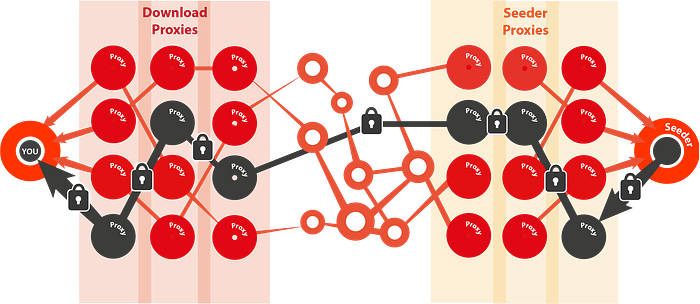
Sometimes, websites block traffic coming from known Tor exit nodes. To avoid this, you can use Tor bridges — special entry points into the Tor network that aren’t publicly listed, making it harder for websites to block your requests. Adding bridges to your TorCrawl.py script can make your traffic appear less like it’s coming from a Tor user, increasing your chances of bypassing anti-scraping mechanisms.
Additionally, by specifying certain exit nodes (the last Tor relay that connects to the destination website), you can control where your traffic appears to originate from. This can help when scraping websites that restrict access based on geography.
To use bridges or specific exit nodes in TorCrawl.py, you’ll need to modify your Tor configuration file (torrc) and provide the necessary details to the Stem library. Here’s an example of how to add a bridge and specify an exit node:
# torrc file configuration
UseBridges 1
Bridge obfs4 192.0.2.0:9001 FFFFFFFFFFFFFFFF FFFFFFFFFFFFFFFFFFFFFFFFFFFFFFFF# To specify exit node:
ExitNodes {US}
StrictNodes 1
Handle CAPTCHAs and Anti-Scraping Mechanisms
Many websites employ CAPTCHAs and other anti-scraping mechanisms (like JavaScript obfuscation, rate limiting, or browser fingerprinting) to prevent automated data collection. These mechanisms can significantly hinder TorCrawl.py’s performance or even block access entirely.
To bypass CAPTCHAs, you may need to integrate external CAPTCHA-solving services (like 2Captcha or AntiCaptcha) into your script. Alternatively, you can use Selenium — a browser automation tool — in conjunction with Tor to simulate human interaction and bypass CAPTCHA prompts.
For JavaScript-heavy websites, you can use headless browsers like Selenium to load the full page, including the JavaScript-rendered content, before scraping the data.
Comparison of TorCrawl.py with Other Web Scraping Tools
While TorCrawl.py is a powerful tool for anonymous web scraping, it’s important to compare it with other available tools to understand its strengths and limitations.
TorCrawl.py vs Scrapy
Scrapy is a widely-used Python framework for web scraping that excels in handling large-scale data extraction tasks. While Scrapy is faster and more robust for typical scraping tasks, it doesn’t natively support anonymity like TorCrawl.py.
- TorCrawl.py: Focuses on privacy and anonymity, making it ideal for sensitive scraping tasks.
- Scrapy: More suited for high-volume scraping tasks with complex data pipelines, but lacks built-in anonymity features.
TorCrawl.py vs Selenium
Selenium is a browser automation tool commonly used for scraping dynamic, JavaScript-heavy websites. Selenium can mimic human interaction by navigating websites and clicking buttons, making it more powerful for interacting with modern web apps. However, Selenium is slower and more resource-intensive than TorCrawl.py.
- TorCrawl.py: Lightweight and efficient for basic web scraping tasks that require anonymity.
- Selenium: Best for scraping dynamic content but slower and less efficient for large-scale scraping.
TorCrawl.py vs BeautifulSoup
BeautifulSoup is a Python library used to parse HTML and XML documents. It is often used in conjunction with requests for web scraping tasks. While BeautifulSoup is great for parsing and extracting data, it lacks the anonymity features that TorCrawl.py provides.
- TorCrawl.py: Offers a combination of anonymity and data extraction.
- BeautifulSoup: Excellent for parsing but lacks scraping and anonymity capabilities.
TorCrawl.py vs Proxies
While proxies can also hide your IP address during web scraping, they do not offer the same level of anonymity.